
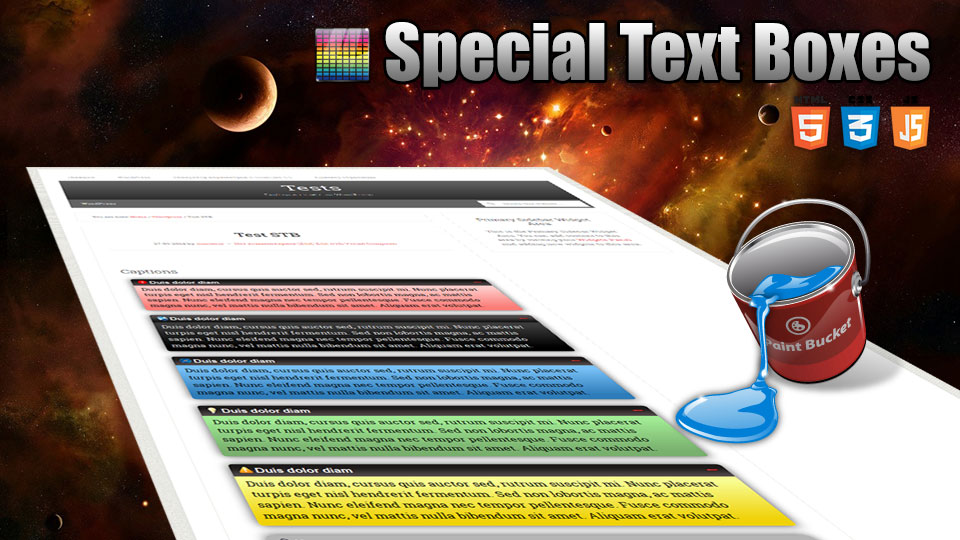
Special Text Boxes is very simple, very little and very useful WordPress plugin (for me and, I hope, for you). It adds little style sheet file and short code to blog for highlighting some portion of text in post as colored boxes. That may be warning, alert, info and download portion of post’s text.
(This post is available on russian language.)
Support Forum for this plugin.
Examples
CSS mode


Javascript mode

Installation
- Unpack plugin archive file.
- Put plugin folder to WordPress
wp-content/pluginsfolder. - Activate plugin on Admin page.
Settings
[svg id=8 only=”35,36,37″]
You can set border style, text shadow, box shadow and Allow or disable rounded corners for your special text boxes.
Available languages of Admin Panel:
- English
- Russian
- Italian by Gianni Diurno
- Belarus by Fat Cower
- Uzbek by Alisher Safarov
- Polish by Daniel Fruzynski
- Arabic by مدونة رسين
- Dutch by Rene
- Ukrainian by official ukrainian localization team
- German by Renate
- Czech by Stanislav Čihák
If you want and can translate this plugin to your language, do it, and send me .po file by e-mail (minimus AT simplelib.com). Thanks.
Styles Repository
Starting with version 4.0.65 plugin allows you to have as many styles as you want. All styles are stored in the styles repository (database table) and can be customized to suit every taste. Styles fall into two categories: predefined (system and special) styles, and custom styles. The parameters of all styles can be changed by blog administrator. The difference is that the slugs (unique names) can be set only for custom styles. Slugs for predefined styles can not be changed.
[svg id=8 only=”38,39″]
Use this repository to customize existing and create new styles of blocks.
Usage
To embed special textbox to your post, use short code as this:

OR
[stextbox id="defined_id" caption="Some Caption"]Highlighted text and/or short code(s)[/stextbox]
where defined_id may be alert, download, info, warning, black, custom and gray.
You can insert short code(s) of another plugin(s) inside wp-special-textboxes short code. For example:
There is example of using Download Manager plugin short code with wp-special-textboxes plugin short code. The result of using this code construction you can see below in the Download section of this post.
Customising “On The Fly”
Customisation Short Code Options:
- color – body font color
- ccolor – caption font color
- bcolor – border color
- bgcolor – background color (CSS mode) or start color of background gradient (Javascript mode)
- bgcolorto – stop color of background gradient (Javascript mode only)
- cbgcolor – caption background color (CSS mode) or start color of caption background gradient (Javascript mode)
- cbgcolorto – stop color of caption background gradient (Javascript mode only)
- image – full URL of pictogram image. Use null value as URL to disable image output
- big – use this parameter in case plugin settings are different with your needs. May be true or false. CSS mode only.
- mode – drawing mode (css|js)
- float – turn on floating mode of Special Text Box. May be true or false.
- align – alignment of box in float mode. May be left or right.
- width – width of box in float mode (pixels)
- collapsed – display STB in collapsed mode if collapse/expand mode enabled. May be true or false.
- mleft – left margin in px.
- mright – right margin in px.
- mtop – top margin in px.
- mbottom – bottom margin in px.
- collapsing – allow/disable collapsing (default|true|false)
- defcaption – allow using name of style as caption of block (true|false)
- direction – language direction (default|ltr|rtl)
[svg id=8 only=”40,41″]
You can use Insertion Dialog to insert short code to post. Just select text you needed and click “Insert Special Text Box” button.
Special Text Box anywhere in blog
You can use function stbHighlightText to output Box anywhere in your blog.
This function defined as
|
1 |
function stbHighlightText( $content = null, $id = 'warning', $caption = '', $atts = null ) |
- $content – text in the Box (string)
- $id – ID of Box (string)
- $caption – caption of Box if needed (string)
- $atts – extended attributes of Box (array)
|
1 2 3 4 5 6 7 8 9 10 11 12 13 14 15 16 17 18 19 20 21 22 23 24 25 26 27 28 |
atts = array( 'id' => 'warning', 'mode' => '', 'level' => 0, 'caption' => '', 'defcaption' => '', 'color' => '', 'ccolor' => '', 'bcolor' => '', 'bgcolor' => '', 'bgcolorto' => '', 'cbgcolor' => '', 'cbgcolorto' => '', 'bwidth' => '', 'image' => '', 'big' => '', 'float' => 'false', 'align' => 'left', 'width' => '200', 'collapsed' => '', 'mtop' => '', 'mleft' => '', 'mbottom' => '', 'mright' => '', 'direction' => '', 'collapsing' => 'default', 'shadow' => '' ); |
- color – body font color (six HEX digits of color without # as string)
- ccolor – caption font color (six HEX digits of color without # as string)
- bcolor – border color (six HEX digits of color without # as string)
- bgcolor – background color (CSS mode) or start color of background gradient (Javascript mode) (six HEX digits of color without # as string)
- bgcolorto – stop color of background gradient (Javascript mode only) (six HEX digits of color without # as string)
- cbgcolor – caption background color (CSS mode) or start color of caption background gradient (Javascript mode) (six HEX digits of color without # as string)
- cbgcolorto – stop color of caption background gradient (Javascript mode only) (six HEX digits of color without # as string)
- image – full URL of pictogram image. Use null value as URL to disable image output (string)
- big – use this parameter in case plugin settings are different with your needs. May be true or false (boolean as string). CSS mode only.
- mode – drawing mode (css|js)
- float – turn on floating mode of Special Text Box. May be true or false. (string)
- align – alignment of box in float mode. May be left or right. (string)
- width – width of box in float mode (pixels) (string)
- collapsed – display STB in collapsed mode if collapse/expand mode enabled. May be true or false. (string)
- mleft – left margin in px.
- mright – right margin in px.
- mtop – top margin in px.
- mbottom – bottom margin in px.
- collapsing – allow/disable collapsing (default|true|false)
- defcaption – allow using name of style as caption of block (true|false)
- direction – language direction (default|ltr|rtl)
- level – nesting level of the block. Only Javascript mode. Allows you to defer the drawing of the indoor block as long as parent block will be drawn. (0|1)
- shadow – enables/disables shadow of block vs default settings
You can partially define atts array (version 2.0.22+). For example:
|
1 2 3 |
<?php stbHighlightText('This is content', 'warning', 'This is caption', array('image' => "//www.simplelib.com/images/wp-b.png", "big" => "true")); ?> |
or
|
1 2 3 4 5 6 |
<?php if(class_exists('StbBlock')) { $block = new StbBlock('This is content', 'warning', 'This is caption', array('image' => "//www.simplelib.com/images/wp-b.png", "big" => "true")); echo $block->block; } ?> |
In this example the image of block was redefined as “wp-b.png” image and this one was defined as big image.
Inserting Special Text Box into Special Text Box
If you want insert one STB to another, you can use additional short code “stb“. For example:
CSS mode
Javascript mode
Special Text widget
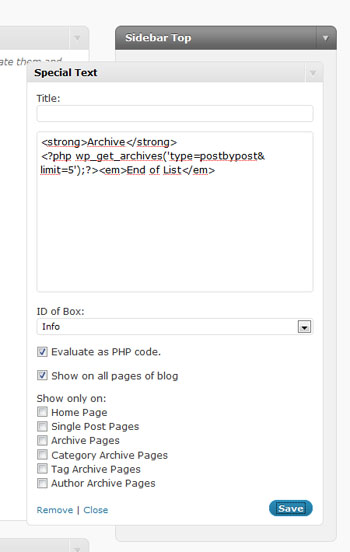
Special Text widget. Admin Page
Download
Special Text Boxes
Highlights any portion of text as text in the colored boxes.
Author: minimus, version: 6.5, updated: March 4, 2026,
Requires WP version: 5.6 or higher, tested up to: 6.9.4.
Download (254 211 hits) 

 (21 votes)
Awards


© 2009 – 2026, minimus. All rights reserved.








Hi
Please assist.
How can I include other plugin codes inside the textbox?
E.g.
Pleae advise
Total Comments by Arnu Buys: 2
You should to use any style of box, exclude Code Style…
Hi
Please assist.
How can I include other plugin codes inside the textbox?
E.g.
/*
*/
Pleae advise
Total Comments by Arnu Buys: 2
Cannot edit posts nor pages when Special Text Boxes is activated.
Thanks in advance for any help.
Total Comments by Carlos Reynoso: 3
[…] //www.simplelib.com/?p=11 с возможностью html и php upd: Хотя это не то,простите =)Related […]
I just did an update to the specialty boxes and it broke my site.
I had to go to my web host to get back into the dashboard.
My site is still up but where I had great looking headers – it is showing code.
site is //www.frequencyflow.com
Can I get the old version back or can you tell me how to fix?
Total Comment by Deb Campbell: 1
[…] Версия 5.9.107 | Автор: minimus | Перейти на страницу плагина […]
What is the shortcode to make the text box floating / sticky?
Total Comment by Michael Oudejans: 1
I love that Plugin. But since version 6.0.0 I get an error with WP 5.9 and WP 6.0: “Fatal error: Default value for parameters with a class type hint can only be NULL in /{my path}/wp-content/plugins/wp-special-textboxes/wp-special-textboxes.php on line 40”. No idea what to do.
Thank you.
Total Comment by Emanuel: 1
What version of PHP you use? It should be at least 7.4 (WordPress requirements).
Please update for the latest wordpress version and please add functionality to install this and then go to settings and set colors or have styles already added in it and then the ability to use this already shown in add new post and then we type what we want in the box and it shows on the single post page.
Total Comment by Gunstra: 1